TikTok is full of cool stuff. One of the things people love is the secret emojis. These are not like the usual emojis you use on WhatsApp or Instagram. These are special TikTok emojis. And they don’t even come from your phone’s emoji keyboard. Instead, TikTok uses its own emoji codes.
You’ve already seen TikTok’s secret emoji system at work if you ever looked at comments on TikTok and saw a round pink face, a small blue crying face or a cheeky dumpling wearing sunglasses. These aren’t regular emojis. These are part of TikTok’s own emoji set and can only be used by typing special emoji shortcodes in square brackets like [smile], [loveface] or [wicked]. It is a feature of which the vast majority of users are unaware. That’s why it’s important to know it gives you an advantage. It includes the complete listing of all 46 TikTok emoji codes, what they look like, when to use them, their history, and the statistics on why they work.
But don’t worry. If this sounds confusing, I’ll explain everything in a simple way. In this blog, you’ll get a full list of TikTok emojis and codes you can use right now. This list is also updated for 2026. Let’s get started.
What Are TikTok Emojis?
TikTok hidden emojis, also known as TikTok secret emojis, are a collection of 46 specially created emoticons available exclusively on TikTok. You can’t find them on either your iPhone or Android keyboard. Rather, you can unlock them by simply typing a certain keyword into a TikTok comment, caption, or reply, inside the square brackets.
For example:
- Use [smile] to draw a small, round pink smiling face on TikTok.
- Type [loveface] on TikTok and it will display a face with heart eyes.
- Type [wicked] on TikTok shows a cheeky face with a smile on it.
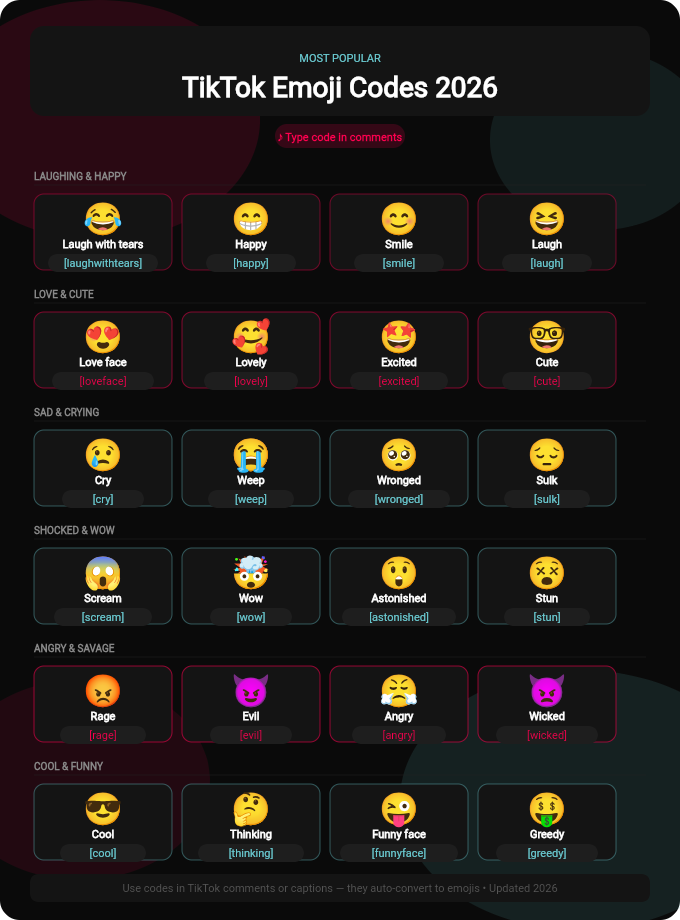
As soon as you press post or sometimes even while typing, TikTok’s system identifies the shortcode and substitutes it with the corresponding custom emoji, which will appear exactly the same on any iPhone, Android, and tablet worldwide. That’s why the TikTok emoji is truly special when compared to the inconsistencies of regular Unicode emoji on different operating systems. It’s like a secret trick that only TikTok users know.
A Brief History of TikTok Emojis
TikTok was introduced worldwide in 2017 when the company merged with Musical.ly. Back in the early days, the only emojis used were the standard keyboard symbols. Around 2019-2020, TikTok quietly added its own custom shortcode system of emojis to make up for its goal of creating its own culture within the app.
Nothing big was announced. No press release. The feature was all brought about by word of mouth: creators posting the “secret trick” in their own comments and videos. The organic discovery of TikTok emojis made them feel like a real insider language, and this only made them more attractive. By 2021, TikTok had reached a billion monthly active users, and these secret emojis were a feature of how TikTok’s community communicated. TikTok currently has around 3,790 standard emojis available via its universal keyboard, but the true “TikTok native” is the 46 hidden shortcode emojis.
Why TikTok Emojis Are Different
These TikTok emojis work only inside the TikTok app. You can use them in your comments, captions, or even in your live chats. They are not normal emojis. TikTok made these to make chats more fun. Also, many users don’t know about these. So, when you use them, your comment looks cooler. Now let’s see the list you came for.
TikTok Emojis and Their Codes (Updated 2026)
Here’s the full list of TikTok emoji codes you can use. Just copy them and paste them into TikTok comments.

(Remember to keep the brackets around the name.)
[smile]😊 Smiling face[happy]😄 Very happy face[angry]😠 Angry face[cry]😢 Crying face[laugh]😂 Laughing face[cute]😍 Cute blushing face[shock]😲 Surprised face[blink]😉 Winking face[cool]😎 Cool face with sunglasses[excited]🤩 Super excited face[loveface]❤️ Love face[wow]😮 Shocked wow face[slap]😳 Shocked + embarrassed[awkward]😅 Nervous smile[complacent]😏 Smug smile[disdain]🙄 Eye-roll face[greedy]😋 Hungry or greedy look[shy]🥺 Shy puppy eyes[sleep]😴 Sleeping face[scream]😱 Screaming face[thinking]🤔 Thinking emoji[stun]🫨 Stunned face[blinkface]😐 Blank blinking face[lovely]🥰 Lovely face with hearts[hehe]😆 Small laugh[tears]😭 Crying with tears[rage]😡 Full angry face[surprised]😧 Surprised shocked face[cute_smile]😊 Soft happy smile[pout]😕 Pouting face
These codes may look funny, but once you try them, you’ll see the emoji change inside the TikTok comment. It works like magic.
TikTok in 2026: Why This Still Matters
Before you start playing with the entire list of emojis, it’s important to know the size of the platform you’re optimizing for. As of 2026:
- The world has about 1.9 billion monthly TikTok active users.
- The U.S. is responsible for about 136 million MAUs.
- According to EU figures, there are 169 million active users on the network in the EU each month.
- Every day, users spend an average of 95 minutes on TikTok, more time than on any other social network.
- TikTok gets uploaded approximately 23 million videos daily.
- TikTok is now the 5th most-used social network worldwide
- The majority of TikTok users take some sort of action after watching a video (92%)
It’s really difficult to stand out in the comments on a platform that big. One of the easiest and most underused ways to do just that is by adding TikTok secret emojis. It’s also been discovered that by using some of TikTok’s hidden emojis, you can boost comment engagement by up to 57%, as they indicate you’re fluent with the platform and are simply more visually striking than regular text.
Why Some TikTok Emoji Codes May Not Work
Sometimes you may type [love] and it doesn’t change. That means TikTok didn’t support that code at the moment. Only the official TikTok emojis work. Also, TikTok sometimes updates its emojis. So, it’s better to use updated lists like this one.
If your emoji code didn’t work:
- Check spelling
- Keep the square brackets
- Make sure you’re on the latest TikTok app
- Try a different emoji from the list
Tips to Use TikTok Emojis Like a Pro
Let me share some easy tricks:
- Mix them with normal emojis
- Use them in replies to viral comments
- Don’t overuse the same emoji again and again
- Try using cute ones like
[shy]or[loveface]for fun
Many TikTok creators use them to reply to fans. It looks more personal and cool.
Are There New TikTok Emojis in 2026?
Yes! TikTok keeps adding new emojis with updates. In early 2026, users reported seeing [hehe], [pout], and [stun] more often. These are not confirmed officially, but they work in many regions. You can test some code yourself. TikTok might add regional emojis, too. So always stay updated with new lists.
TikTok Emoji Codes on iOS vs. Android
One of the most commonly asked questions is whether the TikTok Emoji codes are unique to the iPhone or Android. The short answer is they work just the same on both. The shortcode conversion is carried out on TikTok’s own servers and not your device’s operating system. This means that it feels the same, regardless of whether it’s on iOS 18 for the iPhone 15 Pro or Android 15 for the Galaxy S25. Type [smile], post it and everyone on all devices will see the same round pink face. The only change is slight, for comment typing when you’re using the keyboard, but the shortcode [emojiname] is universal.
Emojis in TikTok Live Streams
The LIVE feature on TikTok is one of its fastest-growing features, and emojis are present in most areas, including within LIVE. Engaging your audience by asking them to drop a [cool] or [loveface] in the chat is one of the easiest engagement hacks when you’re a creator going live, making your stream more interactive and personal. In the live chat, a [wicked] or [shock] is a much more pronounced response for viewers than a simple thumbs up response. With a possibility of thousands of viewers watching TikTok LIVE sessions at any given time, anything that can help your comment stand out from the rest is a good choice to use.
How to Create Your Own Custom Emojis on TikTok
While TikTok does not let you create fully custom emojis, you can still get creative with what’s available by mixing and matching different emoji codes. You can create a unique combination that perfectly expresses how you feel. For instance, if you want to show that you are super happy about something, you could combine [loveface] with [happy]. It is all about having fun and expressing yourself in your own unique way. The possibilities are endless, and you can always try new combos to see what works best for you.
The Psychology behind the popularity of TikTok Emoji
Here are some real data and psychological reasons as to why these little graphics work so well.
- Pattern interruption: The vast majority of comments are plain text. A TikTok custom emoji will immediately disrupt the pattern, drawing attention to your comment amidst thousands of others.
- Emotional signaling: Numerous studies have demonstrated that emojis in digital communication are correlated with less ambiguity, more warmth in the message and more perceived authenticity. If you add a [shy] or [wronged] emoji in your comment, your readers won’t have to interpret your tone.
- Community signaling: The reason most of the users are not aware of the secret emoji is what makes them work. If you’re using [wicked] or [slap], it’s a way of letting others know you are a native of TikTok, or someone who truly lives on the platform. Such social proof brings respect for the creators and the algorithm.
- Algorithm-friendly engagement: The comment interaction rate plays a significant role in the recommendation system of TikTok. Replying to comments and liking boosts the rank of the posts. Secret emoji brings more attention to your comments, allowing the algorithm loop to increase more interactions.
Can You Download TikTok Emojis as PNG Files?
Yes, and this is something that many TikTok content creators and graphic designers do regularly. TikTok’s custom emojis are not found in the regular list of emojis so you can’t search directly for them. There are a number of third party sites, however, providing clear PNG downloads of all 46 TikTok secret emojis for the following uses:
- YouTube thumbnails
- TikTok video graphic overlays
- The designs for social media posts.Social media post designs
- International brands, content and merchandise.
The PNG versions of your favorite TikTok emojis (such as [wicked] or [loveface]) allow you to use them in your created content, even if it’s not a shortcode.
Final Thoughts
TikTok emojis are fun, creative, and make your comments look fresh. You just need to know their codes. That’s why we made this simple 2026 updated list to help you. TikTok’s 46 secret emoji codes are one of the easiest and least-used tools on TikTok. With the amount of video content competing for viewers’ attention every day in a feed of 23 million, and the number of comments hundreds or thousands from other users per day, a decent [wicked] or [wronged] can really make yours stand out from the crowd and get a reply. They’re not magic. They’re a real sign, though, a small icon that lets people know you understand the culture of TikTok, that you’re not the type of person posting hyperlinks hoping for a miracle. On a platform that’s already used by almost 2 billion people every month and has an algorithm that prioritizes real engagement over all else, that signal is significant, but not more than it is. Save this page. Create a cheat sheet and bookmark it. After that, leave a [loveface] for someone on their video, and see the reaction.
Go try some emoji codes right now on TikTok. It’s a cool trick that many users don’t know yet. And remember if someone asks where you learned all this, you can smile and say: From Tech Trick Solutions.

Zaneek A. is a tech-savvy content strategist and SaaS marketing writer. With a sharp focus on helping SaaS brands grow smarter, Zaneek shares simple guides, smart tools, and proven tips that help businesses reach the right audience faster. When not writing, he’s testing new digital tools or breaking down marketing trends into bite-sized insights.